Blog

Over Ambitious Planning for Next Year #iste13

diy_gamification

http://blog.8r4d.com/2013/04/30/6-ways-to-gamify-your-marathon-training

I’ve got a couple ideas for a new approach to my 6th grade class, and I’m pretty much just going to list all the things I’m thinking about. It’s a little jumbled stream-of-consciousness right now, but hopefully writing it all down will help.

I teach 6th grade technology. In the current schedule, I see a group of 18 students one week on Tuesday and Wednesday for an hour each day, and then not again for another month. The librarian also teaches in this rotation, so for next year we are thinking of team teaching the group of 36 students in order to see the kids for more time and have more continuity. In this set up, we would do two-week long projects.

But what kind of project is engaging to 6th graders in an hour-long class right before lunch? Honestly the best class I can remember was teaching them how to use Scratch. Actually, I wasn’t so much teaching as just allowing them the time to play it.

So I have two ideas:

1. Gamify the class using 3DGameLab and turn it into a series of quests. We could find quests that involved using library and tech skills so that they were learning the skills from both classes. Some of the early quests would be fast, like taking a screenshot of their calendar to show they had properly subscribed to all their teachers’ calendars, and some of the later ones could be longer, like designing their own avatar. I’m daunted by the amount of work that would be needed to build this all, but maybe it would be worth it both for the better structure to the class and to test out what that looks like. Hmmm.

  • There is a camp through 3DGameLab to learn how to design your own app, which I’ve always wanted to learn and I have one in mind to build. I could do the camp and get the license to build for students.
  • I would love to pull some ideas from Jane McGonigal’s Find the Future game, like having students write their own constitution and/or origin story.

2. A project that I have always wanted to do with students is to have them design their own avatar or logo. They would first build it as a profile image that they could use for their google apps account. We could talk about image resolution and thumbnails if they were to try and print it the size of a page. It should be an image that looks good large and small. The FINAL step would be for them to print it from the 3D printer as a stamp, so they could stamp their logo.

  • I’d like them to workshop it to get feedback from each other.
  • I want it to be something that is really meaningful to them.
  • They could research logos for different companies, read excerpts from Tipping Point or Made to Stick.
  • They could make Scratch stories to tell their origin story and then turn them in to an adventure game at the end.

At first I was thinking I would have to choose one or the other, but after writing this out, maybe we could do BOTH! I am hesitant to try a new format with a new project, but it seems like a huge opportunity.

Also, my class is a rotation class that meets twice/week and repeats. It wouldn’t be that much prep. And how can I expect other teachers to try it if I don’t? Besides, our head of school asked us to change one thing this coming year. Reimaging my class in both content and form sounds like a good place to start!


Pre #ISTE13

photo

(I had intended to write this last night, but travel exhaustion and a crying baby kept me from my computer…)

It’s my favorite way to celebrate the start of the summer. Now that the tiring, hard work of finishing up a school year is over, I can sit back, relax, and explore/connect/create (Hmmm… sounds very essential competency-ish).

Turns out, I have done significant professional development every June for the last 5 years:

2009 – Finished my Masters of Science in Science Education

2010 – ISTE – Denver

2011 – Klingenstein Summer Institute

2012 – ISTE – San Diego

2013 – ISTE – San Antonio

Honestly, I’m giddy with excitement for the next few days.

I remember my first ISTE in Denver. Thanks to Angela (then MS Tech Coordinator) I attended with several other teachers from OES whom I would later work closely with (Brad, Gomes, Jeffrey, Lara). I had a tough first year in Portland personally and professionally (never underestimate East to West Coast culture shock) and was really questioning where I should be, what I should do. I found myself in the midst of teachers excited about education and all these amazing tools that could really help connect with students. I learned about Google Apps, Twitter, SMART boards, to name a few. Attending that conference probably kept me in teaching.

San Diego last year was different because I was now the tech coordinator and the one responsible for bringing other teachers with me. I also narrowed my focus, concentrating on gaming and professional development. My most memorable sessions were playing WoW with Peggy Sheehy, learning to program in Scratch and AgentSheets, and connecting with current and former colleagues.

This year I’m here again in a few different roles.

  1. Several of my colleagues are here and I’m excited for the conversation it always generates.
  2. I’m presenting a poster Tuesday 4-6pm on my work with SimCity.
  3. I have been selected for the SIGIS (Special Interest Group: Independent Schools) Executive Committee, so I’ll be at the Meet & Greet Sunday 3-5pm and the Yearly Meeting Monday 8:30-9:30am. I’m excited for this chance to volunteer with ISTE, connect with more independent school techies, and work to support others.

Questions that I think all ISTE goers should ask themselves:

How will I organize myself?

  • Evernote for my own notes/thoughts and lists of resources/articles to return to
  • QR code with my contact info so people can scan my phone
  • Phone for tweeting and googling when the internet is down
  • Texting with colleagues

What are my goals for these 4 days?

  1. Be where I am. Don’t try to be everywhere at once and don’t over commit. Stop and have conversations with people rather than running off to something else.
  2. Gaming. I’m hopeful for several gaming-type initiatives at our school so I want to continue to find ways to talk about it with kids, teachers, and administration.
  3. Support. Three out of four of our middle school arts teachers are here to learn about integrating tech into their classroom, particularly with stop motion animation projects. I want to hear about what they learn and what they need from me in terms of support. This is important to me because people often go to conferences and get energized while they’re there, but then lost momentum when they return.
  4. Reflect. Blogging about recaps, highlights, special moments. While I can’t promise 1 post per session, at least once per day.

Let the fun work begin!

Quotes from Kids

Image from http://static.guim.co.uk/sys-images/Guardian/About/General/2013/4/19/1366376886730/Finger-wagging-008.jpg

I asked the following question on my end of year survey/laptop check in (using a simple Google form, of course):

What do you wish teachers/adults would STOP saying, specifically about computers, phones, Twitter, Tumblr, etc.?

Nothing, I think most all of the things teachers/adults ask about computers are reasonable.

Awwww. So sweet and trusting.

Live in the moment. Lots of time I will be living in my moment and keeping up with my friends, and they don’t realize that is how I do it.

Love this. Made me think of this Don’t Carpe Diem  article from the Huffington Post.

I wish adults would stop saying that we can’t lend other people our chargers, but during class when someone asks tells them to borrow a charger.

#kidscallingusout

I think the teachers should be much more aggressive about people goofing off in class. I regularly see people steaming videos, on inappropriate humor sites, and playing downloaded games such as Super Crate Box or Super Mario during class time when they should be working. There is also a lot of phone use during the day. I don’t have a Twitter, Facebook, or Tumblr account (let alone know how to use them), and I don’t like most internet sites, so internet distractions are not a problem for me. I think many more sights than the ones currently blocked should be.

JUSTICE FOR ALL! Also, it’s sites, not sights. Darn those English homonyms.

facebook is stoopid, twitter is stooped, videogames are a waste of time

Lolz.

I ❤ Middle School.

Pinterest instead of Instagram

Pinterest instead of Instagram

My last post was about trying to get myself to use instagram more as I think about visual culture and different ways of social networking. Ironically, as I was struggling with Instagram, I found myself spending time on Pinterest. What?

When I first joined Pinterest a year ago, I didn’t like it. I couldn’t find images I liked, I didn’t know who to follow, and I didn’t really have a mission. I also didn’t understand that it was about pinning things from the web, not just searching pictures other people had posted. This past week, I downloaded the e-book The No Brainer Wardrobe from Tiny Twig. Love the book, and I spent much of Mother’s Day reorganizing my closet (i.e. hanging up all the clothes piled in the corner). One of her tasks is to use Pinterest to find outfits you like in order to determine your style. It took some trial and error to find the search terms that worked, but I finally stumbled onto “Capsule Wardrobes.” Here’s a link to my wardrobe board.

I think Instagram was too hard for me as a starting point because I got stuck trying to take the pictures. Maybe I put too much pressure on finding the exact picture. My number one favorite subject for pictures right now is clearly my son, but I didn’t want to have tons of pictures of him on a public feed. So, regroup, redirect, learn.

It all comes back to how this informs my beliefs on education, and it reinforces for me how important timing can be for each individual. Not every student is going to be ready for a project at the same time, so we need to allow them choice (using Pinterest instead of Instagram to increase my exposure to visual culture) and personalization (wardrobe ideas is clearly not “professional” but this personal use will improve my teaching).

Now I finally understand why people say, “Happy Pinning!”

Instagram #4WeekChallenge

I had an exciting and inspiring conversation with a colleague a week ago about “visual culture,” which is a more comprehensive term that includes visual literacy. I don’t understand most of it right now, but I see the importance of helping students (and everyone) think about the images that they see all day every day. We are going to work this summer to develop resources for teachers and perhaps launch into some curriculum development as well.

It was then that I noticed that my blog posts are pretty much all text even though I consider myself am a visual person. In the spirit of #FacebookFreeFebruary and the #whole30, my goal for the next 4 weeks is to take at least one picture per day and post it to instagram, focusing on a weekly theme.

Follow me on instagram: http://instagram.com/kalipdx

The first week’s theme will be #PLACE

I hope you will join me!

Accreditation Visit

I began working on the report with the self study committee 2 years ago, and this past week we had our visiting team on campus for reaccreditation. As I’ve watched the whole process, I had a couple thoughts:

  • First, we received a commendation for how we did the self study, particularly for our use of technology. The tech infrastructure was my part of the team, so I was particularly proud of that. I’m planning to write up that piece in my portfolio.
  • I would like to be on a visiting team at some point, and I realized that it’s more than just walking around talking to people. You need to be a confident facilitator, whether that is knowing how to ask questions that probe deeper than what is already in the report; you need to be read to step in and redirect conversations that get tangential, circular, or personal; and you need to be prepared to diffuse potentially tense interactions amongst faculty or staff that you do not know or have a relationship with. I was particularly impressed with the two men who facilitated our middle school discussion and the questions that they asked.
  • One of the biggest realizations I came to in our middle school discussion was that, for the most part, people WANT feedback on their teaching. We want our colleagues to visit our classrooms. We are proud of the good work that we do and want to make it better. This is one of the reasons I love being in the Critical Friends Group with four of my colleagues. It gives us a place to get constructive feedback on units or projects. I reaffirmed for me the importance of this protocol.

I’m no longer on any committees or taskforces, which makes me a little sad, but there are other projects in the back of my mind that I’m ready to focus on!

Juggling

I am lucky enough to get to drop in and juggle with the 7th grade drama class now and then. Today, however, I’m thinking about juggling in terms of how many projects I’ve committed myself to this spring and the dwindling amount of time in which to complete it all!

Big spring projects on my mind:

  • SimCity begins in the 7th grade in a week
  • MineCraft began today – we’re playing it with 6th graders in activities for the next 4 weeks
  • Trying to learn NetLogo well enough to do a pull out project in 8th grade history
  • Make a plan for efficiently collecting and imaging all the MS laptops
  • Creating a poster to present the SimCity project at ISTE
  • Beginning a Faculty Learning Group
  • Writing out a proposal for converting one of our classrooms into a Design Lab

Personal vs. Professional

In the world of social media, the line gets gray…

At the Klingenstein Summer Institute, they asked us to write down “questions we are living.” I love the idea of living a question because conceptualizing a question this way allows space to explore it through everyday experiences and think about it without seeking one answer. For example, at the time, I wrote:

  • What is good enough?
  • Who inspires me? Do I inspire my students?
  • How can I make the greatest impact? Is it in schools? Is it in policy? Education law? Direct leadership?

A question that I am living right now is,

Where is the line between personal and professional?”

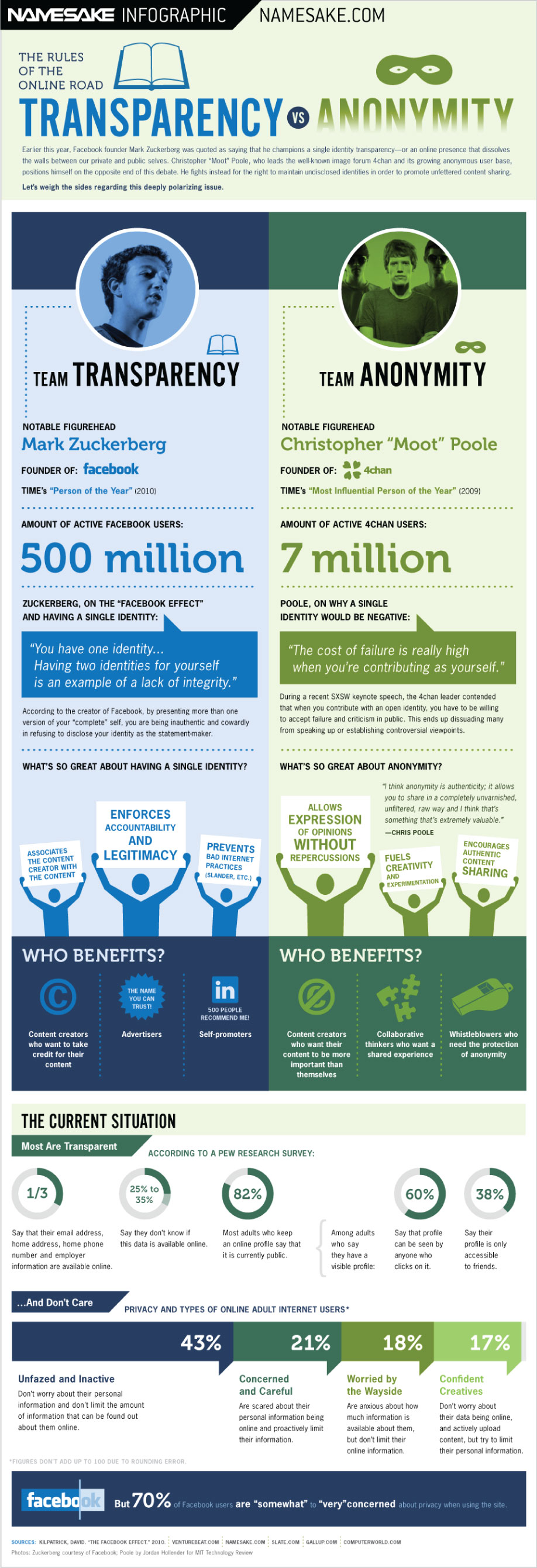
This is called “Single Identity Transparency,” where our online presence is the same as our offline self. There are legitimate reasons for being who you are and their are legitimate reasons for being anonymous. (Changing your name to be on Facebook underage is NOT one of them…)

Here are a couple (12) infographics about the internet and identity.

Usernames & accounts. I tweet with the handle @pdxkali. When I created this username, I didn’t think too hard about whether this would be a personal or professional account. I have kept it because too much content is associated with this account now that I wouldn’t want to lose, but I wish now that I was @julierobison because it is a professional account. I don’t do a whole lot of personal tweeting, though I occasionally share something about being a new mom.

In contrast, a few people that I follow on twitter for their educational comments put personal content like pictures from vacation or check-ins at events that I don’t really care about. Their twitter feed is primarily personal. (I should probably unfollow them and just subscribe to their blogs…)

A couple of my colleagues decided to make two usernames, one for personal and one for professional, but I was mentioning the wrong one in my tweets or they wouldn’t be paying attention to both feeds.

I have always kept separate work and personal email addresses, because if I leave a job, I don’t want any accounts tied to an email address I no longer have access to.

When I started blogging, I initially created the oesmstech.wordpress.com and was blogging as the middle school tech coordinator. When I started to write more personal posts, like this one, I wanted it associated with me, not with my position.

Devices. We have been piloting iPad minis right now, and a colleague who already owns one, asked if he could borrow one for school use. Realistically, though, carrying around another device is just going to confuse things and wouldn’t he rather just have everything in one place? iOS devices are increasingly designed to be personal and group management of them is difficult. So should schools buy iOS devices for employees and have them use their personal accounts?

I carry around my iPhone all day at work. Sometimes I answer personal text messages, but the tech department often goes between email, text, or calls to reach each other. It’s beneficial to the school for me to use this device for my job, but I pay for it. On trips, we often use our phones for finding directions or emailing parents or taking pictures.

Boarding schools. As a dorm parent, I live where I work. I can see into classrooms out my front door. Kids see me on the weekends after a workout or at dinner feeding my 7 month old mashed peas. Clearly, I have accepted a blurrier line than most!

Final thoughts:

  • I feel comfortable with my current blend of professional and personal, though sometimes if feels like the workday never ends. (And at boarding schools, you are never really off duty until vacation!) I love my job and spend a lot of time outside of M-F 8-4pm thinking about education and teaching anyway.
  • People who are not connected to me via social media (professionally or personally) don’t know me as well.
  • Perhaps blending personal and professional allows us to see each other as more human? Maybe in workplaces where this happens there is greater social cohesion?
  • This whole idea of separate identities is very industrial-age with the idea that you go to a specific place for a specific length of time to do work.

The end of #FacebookFreeFebruary

What started as a big deal is no longer such a big deal. This elimination diet worked great!

  • After the first weekend of feeling cut off and alone, I realized that I needed the support that those people offer, so I allowed myself to go on Facebook for the two groups that are important to me: Mary’s Moms and the CrossFit Nutrition group.
  • I do not need to spend hours going through the “fakebooked” feed. See this mom’s rant against the perfect appearance that people put forward.
  • Will I reinstall the app? I’m not sure. I honestly feel like I wasted less time by not having it on my phone. I could still get to my groups when I wanted, but having that small barrier got me out of the reflex to open and scroll. Maybe I just shouldn’t have it on the first screen!
  • I’ve definitely shifted to posting on my blog and tweeting more. Success!

Bottom line: The online relationships will build are REAL, emotion, and important. When we tell kids to “just turn it off”, we ignore the importance, and we need to help them learn how to manage it in their lives.

Instagram #ParentPartnership #KeepingUpWithKids

Remember the themes of our partnership:

  • Create a Common Culture
  • Stay Informed
  • Start the Conversation

Definition of social networking: “The use of a dedicated Web site to communicate informally with other members of the site, by posting messages, photographs, etc.” (From Google)

  • Profile- and connections-based – Facebook, Google+, LinkedIn
  • Media sharing – Flickr, Instagram, YouTube, Vimeo, Pinterest
  • Blogging – long posts – Blogger, WordPress
  • Microblogging – short posts – Twitter, Tumblr
  • Forums – interest-based
  • MMO (Massively Multiplayer Online) Games – World of Warcraft

Instagram.

  • Take pictures and apply different effects
  • Automatic sharing to Facebook, Twitter, etc.
  • Picture sharing
  • Captions with Hashtags

Hashtag: word or phrase after the “#” sign. Meant as a way to tag posts so that you can search the stream. For example:

#Timbers #ftw #ilovepdx

  • You can follow people
  • You can comment on or like (heart) their pictures

Platforms

  • iOS (iPad, iPod, iPhone) App
  • Statigr.am

Setting restrictions on an iOS device #parentalcontrols

Instagram TOS (terms of service)

  • Must be 13
  • App is 12+
  • Just bought by Facebook

Great opportunities with Instagram

Challenges

  • Privacy of pictures
  • Posting statuses using a picture